
It asks again when an answer is thin.
Other forms record “it was bad” and move on. chatform asks one more question, in plain words, and records the real answer.
Ziang Xiao et al., ACM Transactions on Computer-Human Interaction 27(3), 2020A free online form builder
Describe your form and AI builds it. Then it runs as a conversation that asks again when an answer is thin, and follows up with the people who leave.
A real chatform. Go on, answer it.
Hi! This is a real chatform.
Eight quick questions, under three minutes.
Product tour
Not another form builder
Other forms wait to be filled in. chatform asks again, follows up and answers back.
Other forms record “it was bad” and move on. chatform asks one more question, in plain words, and records the real answer.
Ziang Xiao et al., ACM Transactions on Computer-Human Interaction 27(3), 2020Other forms lose them. chatform emails them back to the question they stopped on, with their answers kept.
Henry Sauermann et al., Research Policy 42(1), 2013Other forms go quiet when someone is unsure. chatform answers from what you gave it, then picks up where they were.
A knowledge base it quotes
Your docs, pages and notes. Not the internet.
A goal and a voice
Like “qualify the lead, then book a demo”.
Guardrails
Topics it won’t discuss, and how it declines.
Already using something else?
Paste a Typeform, Google Forms, Tally, Jotform or Youform link, or any page with a form on it. We copy the questions and the logic, and you can talk to it before you sign up.
Typeformchatform
Questions, choices, required fields, welcome screens and jumps come over, then it follows up when an answer is too thin.
Free. No account needed to try it.
How to switch
Your original form keeps working. Responses stay where they are, so export them before you switch.
Meet your AI form builder
You get the questions, the wording, the order and the branching, ready to edit and publish. Then it stays on to ask them.
Type what you want. “Onboarding for a design agency” becomes a whole form.
Or paste your website. It reads your pages and asks in your own words.
Then just ask for changes. “Add a budget question and skip it under 10 people.”
It starts with a sentence
Onboarding for a design agency
read northwind.co — 6 pages
Drafted 4 questions
What should I call you?
Short text
Work email
How big is your team?
Number
Rough budget?
Single select
A builder that stays out of your way
Everything is on one screen: the questions on the left, the form as people will see it on the right.
Pick from every kind of question, drag them into order, and branch on any answer.
Start from a theme, then set your own colour. Light or dark, round or square.
A link, a QR code, a corner button or an embed on your own site.
The right block for every ask
Twenty-seven of them, and every one has its own control in the chat: chips, stars, a calendar, a signature pad. People can still just type.
Make it yours
Every form starts on a theme you can change in a click, then bend to your brand.
Watch the styles change, or try the controls yourself.
Accent
Font
Page
Corners
No caps on what you collect
Responses are the whole point of a form, so the free plan keeps every one of them: no monthly cap on submissions, and no card to start.
A fair-use limit applies to unusually high volume. Details on the pricing page.
Easy on the surface, a lot underneath
Branch on any answer with nineteen operators, nested groups and scoring. Every path is checked before you publish.
Choices stay instant and exact. Free text is read for what it means, and when it isn’t sure, it asks instead of guessing.
A live feed for Google Sheets and Excel, signed webhooks to your own server, an API, and a connector for your AI assistant.
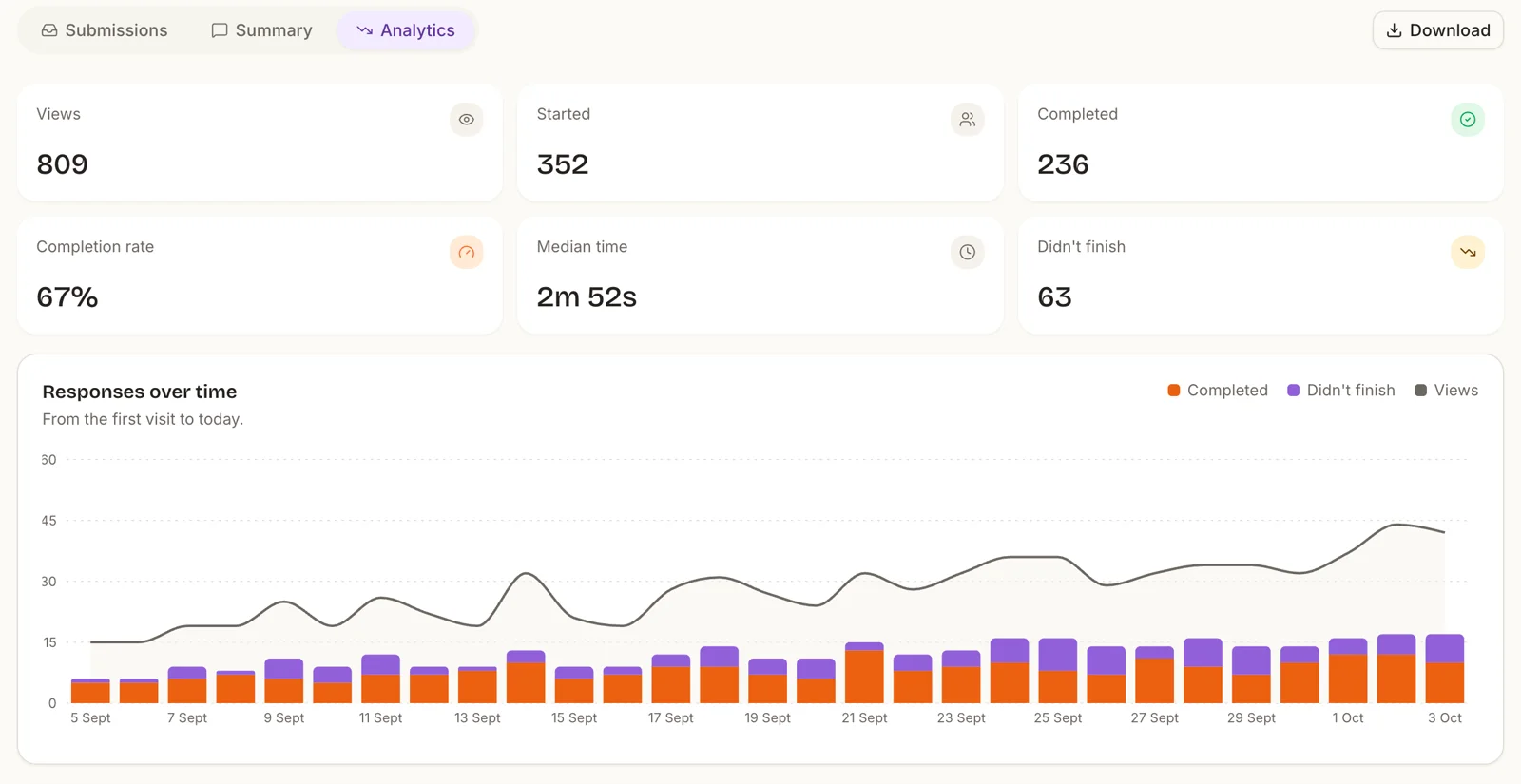
Understand every step of your form
Views, starts, completions and how long people take, with where they came from and the device they used.
Talk to your responses
Add chatform to Claude or ChatGPT with one link, then ask about your responses in plain words. Charts, summaries and takeaways, from the assistant you already use.
Pick a question.
How is my contact form doing? Show me a chart and what to fix.
Illustrative. Your assistant answers from your own responses.
Partial submissions
Most people who leave a form had already told you something. chatform keeps it, so a half-finished response is still a lead.
Each answer is saved the moment it is given, not when somebody reaches the end.
If they close the tab at question six, you still see the first five, marked as partial.
Reopening the link offers to pick up where they left off, and a follow-up email can remind them.
For the forms where it matters who answered, and who on your team can see it.
Ask people to confirm who they are before they answer: a code by email, a code by SMS, or Google sign-in.
Keep forms in workspaces and invite your team as admins, editors or viewers.
Read, filter and export your responses whenever you like, and delete any of them at any time. Your answers are never used to train an AI model.
If you have a developer, this bit is for them. If you do not, you will never need any of it. Skip straight to the pricing.
sk_live_ keys, hashed at rest, shown once, revocable, last-used tracked.
SSE for the hosted form. One request and one reply for your backend.
At /openapi.json. Our own web client is generated from it, so it cannot go stale.
# Start a conversation from your own backend
curl -X POST https://api.chatform.in/v1/forms/frm_8Kd2/chat/sessions \
  -H "Authorization: Bearer $CHATFORM_API_KEY" \
  -H "Content-Type: application/json" \
  -d '{ "hiddenFields": { "plan": "trial" } }'

# Answer, and get the next question back synchronously
curl -X POST https://api.chatform.in/v1/chat/sessions/ses_91xQ/messages \
  -H "Authorization: Bearer $CHATFORM_API_KEY" \
  -d '{ "text": "we are about a dozen people right now" }'
# => { "messages": [...], "recorded": { "team_size": 12 }, "done": false }
Skip the blank page
A few of the 291 ready-made forms, surveys and quizzes.
Form · Marketing
Everything you need before the first client session, asked in the right order.
Make it yoursSurvey · Customer success
Measure loyalty, then ask detractors, passives and promoters different things.
Make it yoursForm · Event
Collect RSVPs with plus-ones, dietary notes and travel.
Make it yoursGood questions
There is a good answer on the other side
Free forever. No credit card. Unlimited submissions.