



 Almost done!













































































It asks again when an answer is thin.
Other forms record “it was bad” and move on. chatform asks one more question, in plain words, and records the real answer.
Ziang Xiao et al., ACM Transactions on Computer-Human Interaction 27(3), 2020A free online form builder
A free conversational form builder. Run it as a chat or one question at a time, with stickers and memes or clean and professional.
Every look here is a real template.
Brainrot · Chat
Now answer a real one.
6 questions, about 2 min.
Product tour
Chat mode or Form mode
Run a form as a conversation, or as a Typeform-style form with one question at a time. Switch in one click and keep your questions, logic and design.
Interactive forms with a personality
20 themes in one click, from a cat-meme sticker bomb to calm and corporate. The fun ones bring their own memes and stickers that move. Not sure which fits? The AI reads your form and picks for you.
Brainrotinternet chaos, memes and reaction faces
Cat memea cat begging you to fill the form, reaction cats and pleading eyes
Y2Kglossy early-2000s pop, butterflies, sparkle and chrome
Cozywarm drinks, slow evenings, soft and calm
Retro arcadepixel games, high scores and neon on cream
Touch grassoutdoors, plants, sunshine and fresh air
SpookyHalloween, ghosts and pumpkins in the dark
Corporateclean, trusted and businesslike, nothing in the way
Startupmodern product launch, soft shapes and a confident colour
Minimal monogreyscale and monospace, stark and precise
Partycelebration, birthdays and nights out, loud and happy
Sticker bombGen Z stickers everywhere, loud and iconic
Kawaiicute pastel animals, sweets and hearts
Neon nightdark, glowing and spacey, late-night energy
Scrapbookhand-drawn people and doodles on notebook paper
Game daysport, teams and competition, high energy
Minimal popclean and bold, simple shapes in one colour
Editoriala magazine page, serif type on paper
Luxurydark and refined, premium and quiet
Calm carehealthcare and wellbeing, soft green and unhurried
Form customization
44 colour themes, gradients and patterns, light or dark, and 600 fonts on Pro. Then drop in stickers, GIFs, memes, shapes and text with effects, and drag them anywhere. Like Canva, for forms.
Themes with stickers
Colour themes
Corners
The Elements panel
Search GIFs, stickers and memes from our library without leaving the builder, or pick from the packs that come with it. Then make any of it float, bounce, wiggle or spin.
Good looks, and good at asking
Other forms wait to be filled in. A chatform asks again when an answer is thin, answers people's own questions, and follows up with the ones who leave.
Other forms record “it was bad” and move on. chatform asks one more question, in plain words, and records the real answer.
Ziang Xiao et al., ACM Transactions on Computer-Human Interaction 27(3), 2020Other forms lose them. chatform emails them back to the question they stopped on, with their answers kept.
Henry Sauermann et al., Research Policy 42(1), 2013Other forms go quiet when someone is unsure. chatform answers from what you gave it, then picks up where they were.
A knowledge base it quotes
Your docs, pages and notes. Not the internet.
A goal and a voice
Like “qualify the lead, then book a demo”.
Guardrails
Topics it won’t discuss, and how it declines.
Meet your AI form builder
You get the questions, the wording, the order and the branching, ready to edit and publish. Then it stays on to ask them.
Type what you want. “Onboarding for a design agency” becomes a whole form.
Or paste your website. It reads your pages and asks in your own words.
Then just ask for changes. “Add a budget question and skip it under 10 people.”
Or say “decorate for me.” It reads your form and designs a look for it: colours, type, pictures and music.
It starts with a sentence
Onboarding for a design agency
read northwind.co — 6 pages
Drafted 4 questions
What should I call you?
Short text
Work email
How big is your team?
Number
Rough budget?
Single select
The product tour
One form, from a sentence to a pile of answers. Every feature on the way, in under three minutes.
Pick from every kind of question, drag them into order, and branch on any answer.
Themes, backgrounds, stickers and text, dragged wherever you want them.
A link, a QR code, a corner button or an embed on your own site.
The right block for every ask
Twenty-eight of them, and every one has its own control in the chat: chips, stars, a calendar, a signature pad. People can still just type.
Easy on the surface, a lot underneath
Branch on any answer with nineteen operators, nested groups and scoring. Every path is checked before you publish.
Choices stay instant and exact. Free text is read for what it means, and when it isn’t sure, it asks instead of guessing.
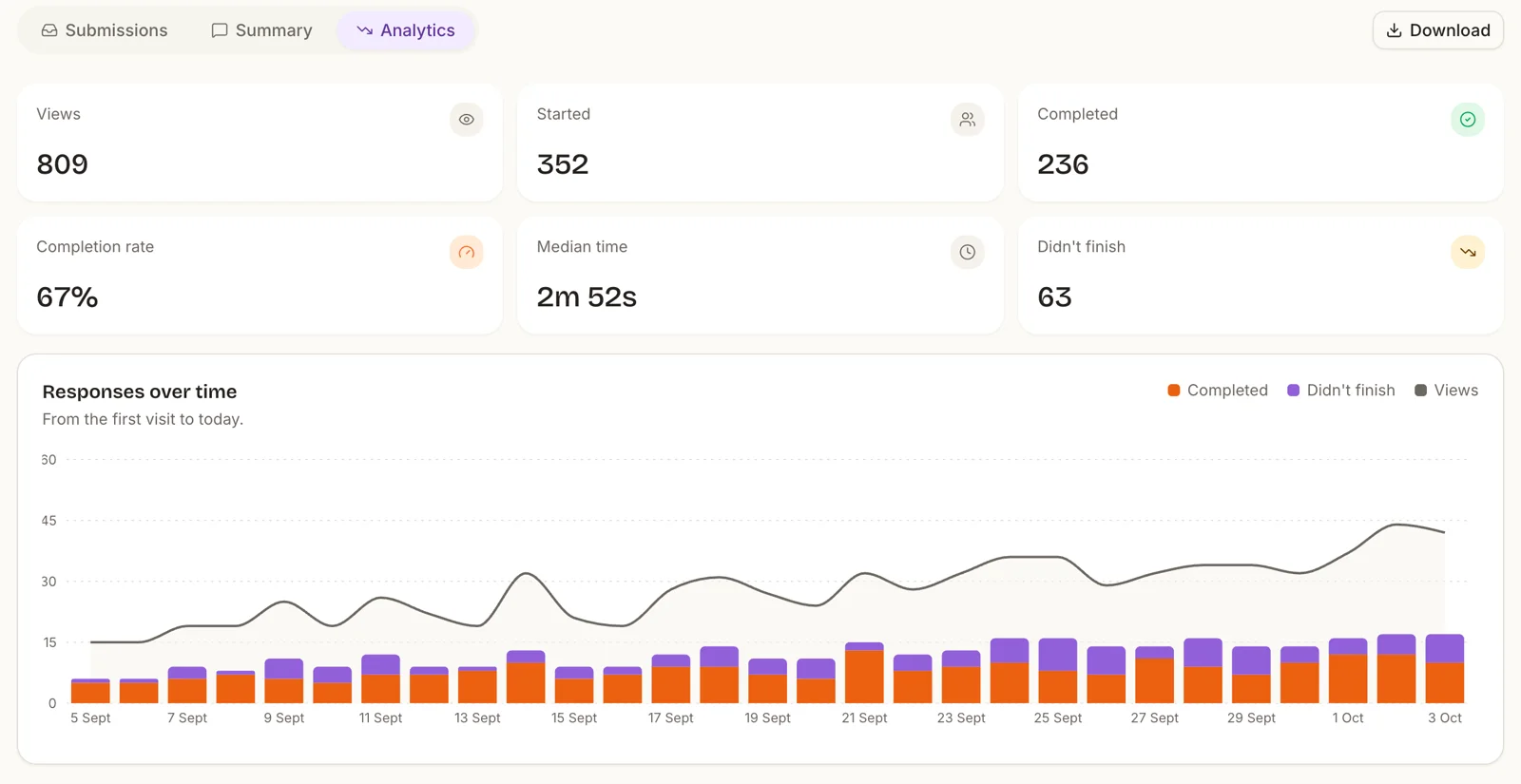
Views, starts and completions, plus the drop-off funnel and answer rate for every question.
A live feed for Google Sheets and Excel, signed webhooks to your own server, an API, and a connector for your AI assistant.
No caps on what you collect
Responses are the whole point of a form, so the free plan keeps every one of them: no monthly cap on submissions, and no card to start.
A fair-use limit applies to unusually high volume. Details on the pricing page.
Already using something else?
Paste a Typeform, Google Forms, Tally, Jotform or Youform link, or any page with a form on it. We copy the questions and the logic, and you can talk to it before you sign up.
Typeformchatform
Questions, choices, required fields, welcome screens and jumps come over, then it follows up when an answer is too thin.
Free. No account needed to try it.
How to switch
Your original form keeps working. Responses stay where they are, so export them before you switch.
Skip the blank page
A few of the 322 ready-made forms, surveys and quizzes, each one yours to restyle.
You're invited! 🎉 Tell us you're coming and we'll save you a spot on the dance floor.
What's your name?
Form · Event registration
Who's coming, who they're bringing, what they eat and what they want to dance to.
Make it yoursForm · Marketing
Everything you need before the first client session, asked in the right order.
Make it yoursI made a playlist 💿 and I need your honest opinion. Be nice. Or don't.
Overall, how good is it?
Survey · Other
Friends rate your playlist, name the best and worst track and add their own picks.
Make it yoursGood questions
There is a good answer on the other side
Free forever. No credit card. Unlimited submissions.